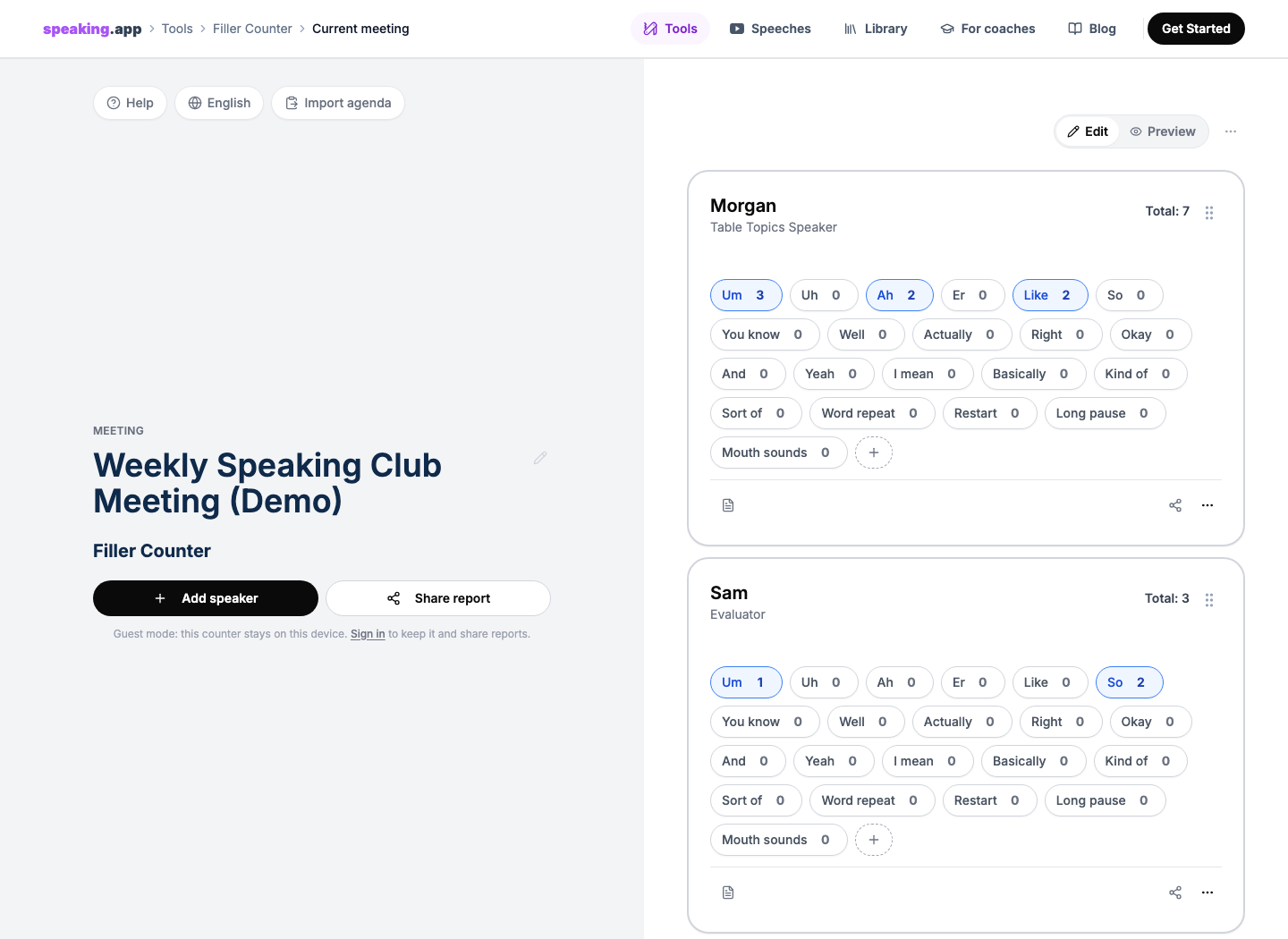
“Um.” Tap.
“So…” Tap.
“Like…” Tap.
The speaker sits down. Someone else stands up. You select the next name. You hear an “and,” decide that it belongs in the sentence, and do not count it. Then an “uh” arrives while you are still checking the previous tally.
In a Toastmasters meeting, one member volunteers as the Ah-Counter. They listen for filler sounds, overused words, and distracting pauses, then give the group a short report near the end.
Counting one filler is easy. Counting several kinds of fillers, for several people, across a live meeting is not.
That was the problem we wanted to solve when we built the free speaking.app Filler Counter for the Toastmasters Ah-Counter role.
We wanted to help the Ah-Counter stay attentive, move quickly between speakers, and prepare a useful report.
The Ah-Counter must listen and classify
Toastmasters International describes the role as listening for overused words, filler sounds, and overlong pauses throughout the meeting, recording them, and reporting the observations during the evaluation portion. That is the part near the end when meeting-role holders give their reports.
That short description contains several tasks:
- Notice a possible filler while still listening to the speaker.
- Decide whether it really was a filler.
- Identify who said it.
- Classify it as “um,” “ah,” “like,” “you know,” or something else.
- Update the correct tally.
- Return your attention to the speech before the next one arrives.
The second step matters. “And,” “but,” and “so” are not automatically verbal distractions. A Toastmaster magazine guide to the role makes the same distinction: context determines whether one of these words is functioning normally or merely filling space.
That is why our counter is manual. It does not record the meeting, turn on a microphone, or ask a transcript to make the judgment. The Ah-Counter listens and decides. The interface handles the bookkeeping.
It runs in the browser on a phone, tablet, laptop, or desktop. The live counter does not require an account. People who use it regularly can also install speaking.app as a web app, but installation is optional.
For a complete role script and a neutral report example, we also maintain a separate Toastmasters Ah-Counter guide.
Make each count quick
We started with a product hypothesis: part of the pressure comes from splitting attention between the speaker and the tally sheet.
With a paper grid, you hear something, look down, find the right row and column, make a mark, and find your place in the speech again. Lose your place on the page and you may miss the next filler. If the totals still need to be added at the end, the report becomes another live task.
We wanted each count to take as little attention as possible, and we wanted the repetitive part of the role to feel quick and satisfying rather than tedious.
Hear it. Decide. Tap. Keep listening.
Each speaker gets a separate card. Each filler gets its own large button. A tap changes the number immediately and gives visual feedback. On devices that support it, there is a brief vibration too. A long press removes an accidental count. You can attach a note to a speaker and move to the next person without rebuilding a paper grid.
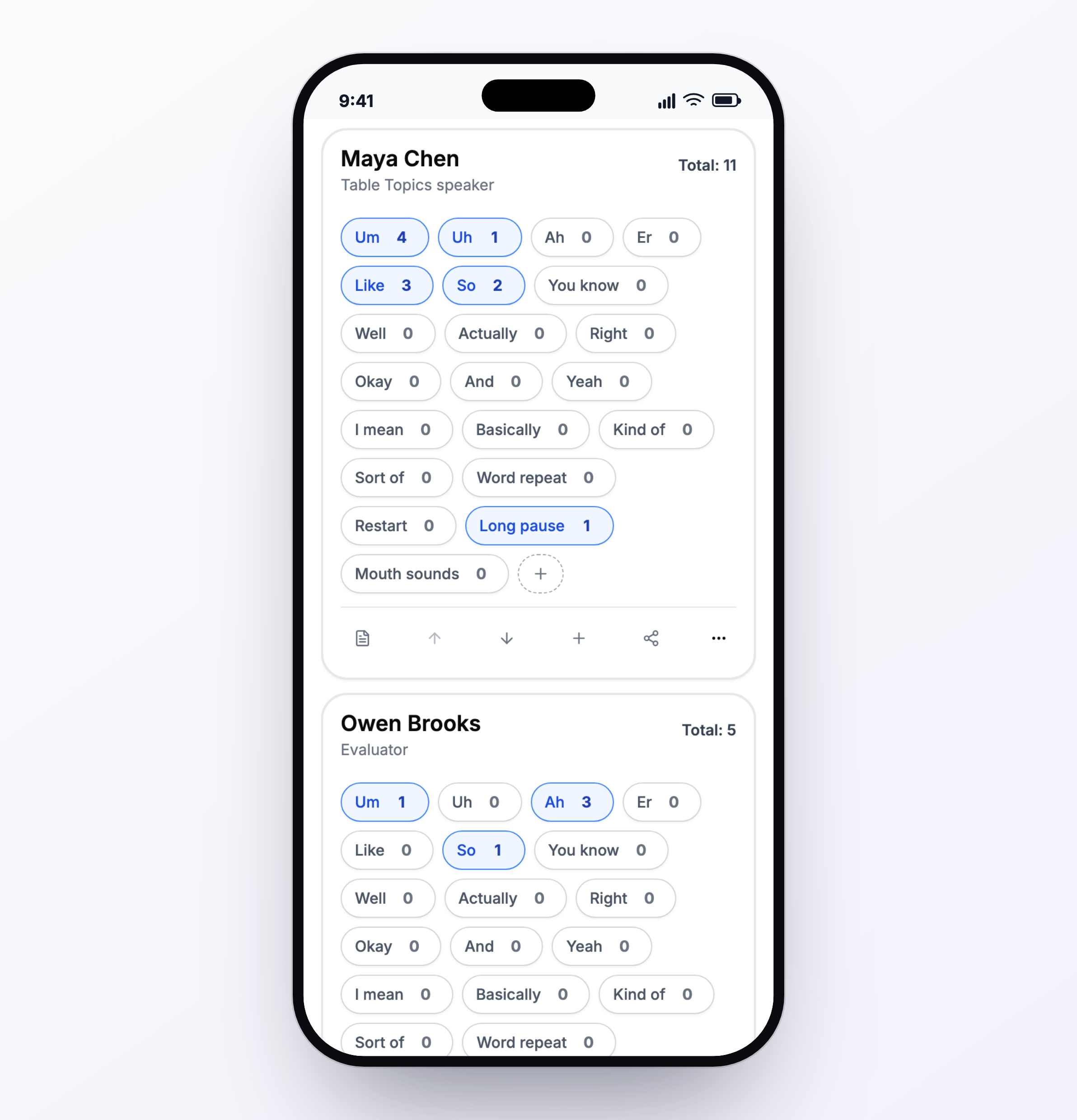
A real mobile capture inside the same phone proportions used on our Toastmasters pages. The layout keeps the counter under one thumb, with “Long pause” alongside filler sounds, repeated words, and restarts.
Immediate feedback keeps the task focused. This is not a competition between speakers. The aim is to notice a verbal distraction, record it, and return attention to the speech.
Preview the report before you speak
When the evaluation section begins, the Ah-Counter should not have to perform arithmetic under pressure.
The counter already knows the totals. Switching from Edit to Preview turns the live cards into a report with each person’s overall count, most frequent fillers, and breakdown by word. Instead of converting a page of marks into a speech in real time, the Ah-Counter can focus on what is useful to say.
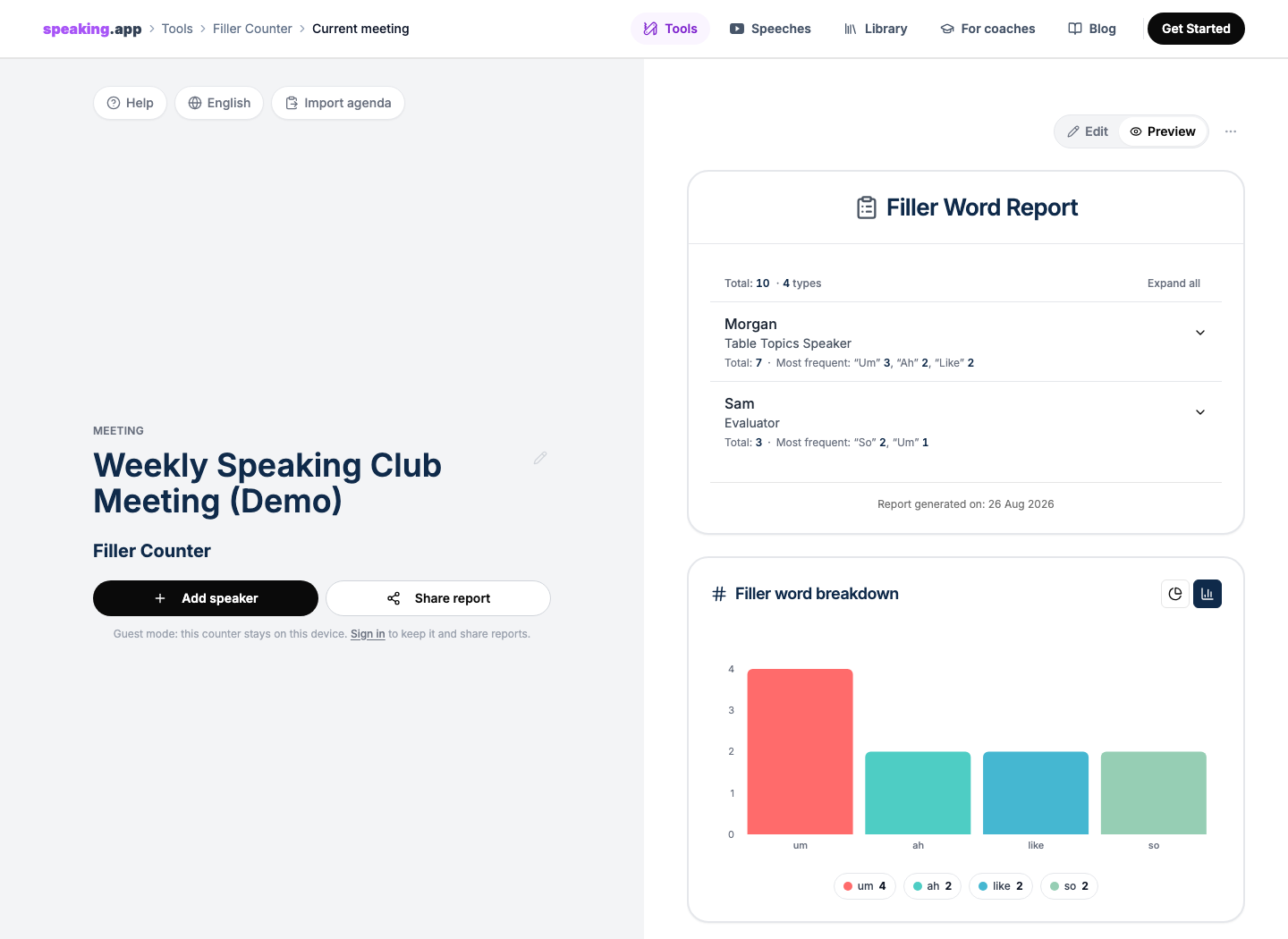
The report turns the live taps into a clear result for each speaker.
Each person remains a separate part of the report because the Ah-Counter role calls for observations about everyone who speaks. Each speaker can interpret their own result in context.
One person may rely on “um” during transitions. Another may restart sentences. A third may leave pauses that the Ah-Counter judges to be overlong. Those are different observations, and each speaker can decide what the result means for their own practice.
Toastmasters explicitly includes overlong pauses in the Ah-Counter role. We therefore added Long pause to the English counter by default. It is still a human judgment: an intentional pause for emphasis should not automatically be counted as a problem.
The report also turns the meeting totals into bar and donut views. The graph answers a useful meeting-level question: which verbal patterns appeared most often?
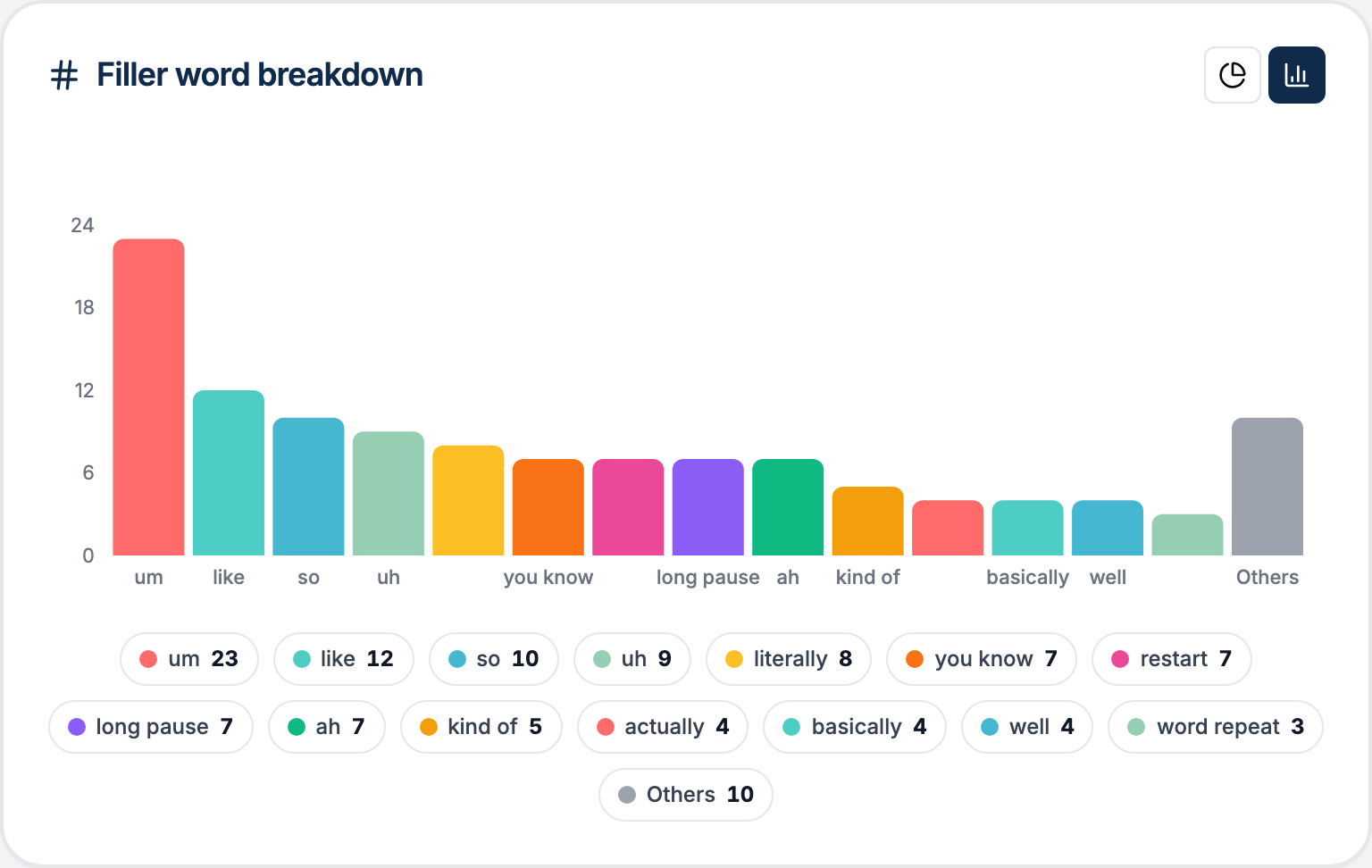
The report can switch between a count-based bar chart and a proportional donut chart. This close-up uses fictional demo data.
Zero is not the only useful result. Filled pauses do not all work in the same way. In a 2001 experiment, psycholinguist Jean E. Fox Tree found that “uh” helped listeners recognize an upcoming word, while “um” neither helped nor harmed recognition. This was a narrow laboratory result, but it shows why “remove every filler” is too simple a rule.
Toastmasters guidance also emphasizes constructive reporting. An article on improving the Ah-Counter report recommends focusing on a speaker’s main crutch word, limiting potentially embarrassing numerical callouts, and praising effective pauses.
A good report should create awareness, not shame.
Keep the report only when it is useful
A spoken Ah-Counter report is deliberately brief. If the underlying counts live only on paper, the detail may be difficult to revisit once the meeting ends.
Keeping that detail should be optional. The live counter works without an account. A free account is required only if the Ah-Counter chooses to save the session or create a shareable report link. People who receive the link can open the report in a browser.
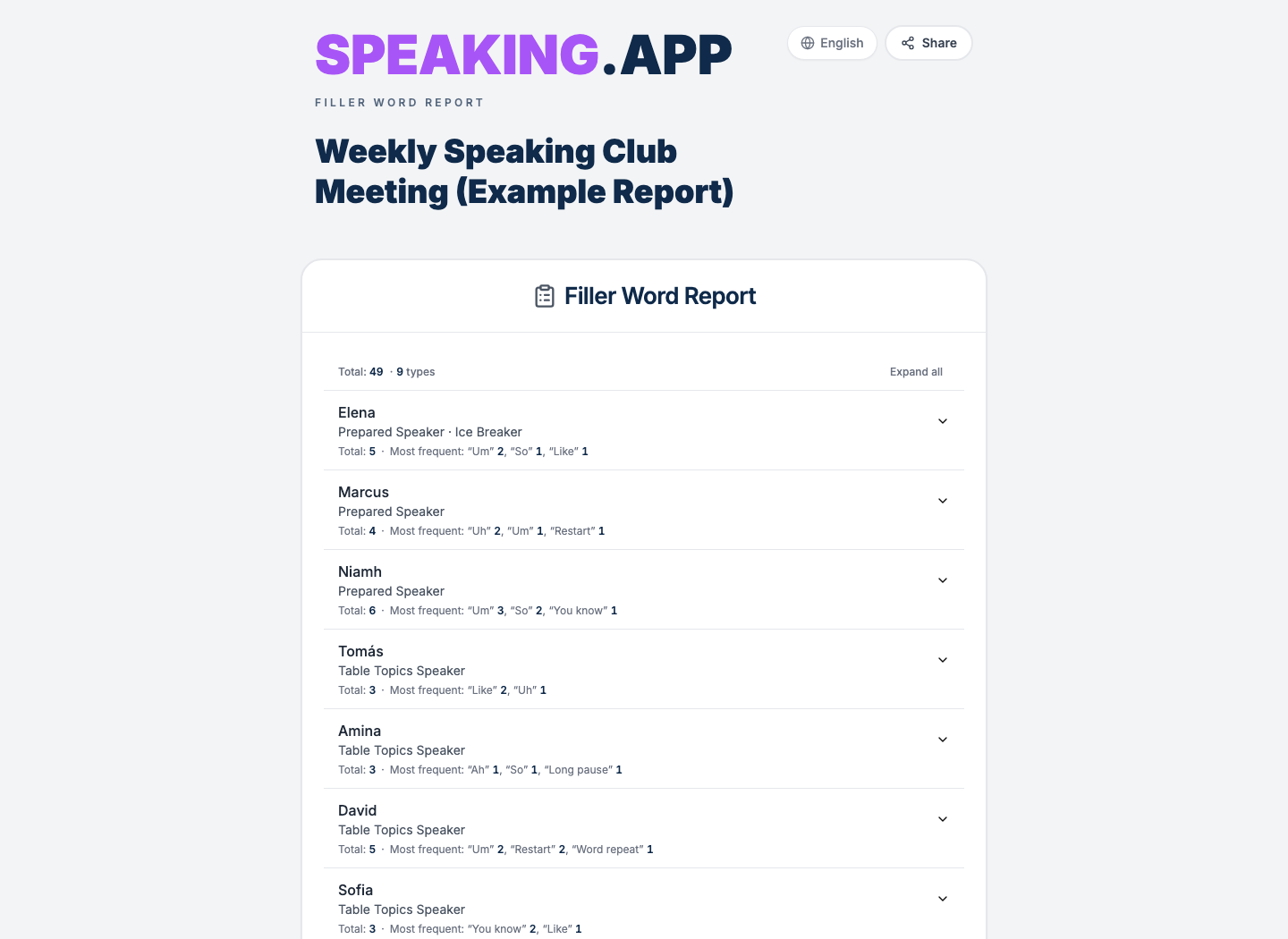
This is the recipient-facing shared-report view, not the Ah-Counter’s editing screen. The meeting, speakers, and counts are fictional demo data.
You can open the same live example report to see what a recipient gets after following the link. The report page is the real product; only its meeting data is fictional.
Clubs that want a private history can keep the Ah-Counter report beside the Timer report for the same meeting in a Club Home. The current product preserves those individual reports; it does not yet calculate trends across meetings.
Even without a trend line, a saved report can be useful. A member can revisit their pattern before a future speech. An evaluator can refer to the detail later. A club can retain what it actually observed rather than relying on memory.
Let the tool manage the totals
The Ah-Counter still has to listen. That is the point of the role, and no button should replace the human judgment involved.
The tool can handle the repetitive work: keeping each tally with the correct speaker, adding the totals, and preparing the report.
Our goal was to make the live task easier to manage and the final result easier to use.
The next article in this series explains how we designed the Speech Timer around a complete meeting.
You can try the free Filler Counter in your browser. No account or microphone is needed to start.
speaking.app is an independent product and is not affiliated with or endorsed by Toastmasters International. Product details and source links were checked on August 26, 2026.